
Create Captivating GIF Animation Images / Backgrounds Instantly & Easily
DP Animation Software is designed especially considering less experienced people who find it difficult to use complex software but still want to create good professional looking animations.
DP Animation Maker consists of inbuilt amazing animation effects gallery which can be applied to the image of your choice. First of all choose a background image then select the animation effects as per need.

A rich tool set lets you create aquarium backgrounds, nature scenes, or abstract animations. It includes:
- Weather effects
- Light effects
- Fish
- Plants
Not just inbuilt effects but also you can import another image and customize its animation. The preview of the resulting image is shown realtime as you go on applying animations.
The output can be exported as GIF Animation image, AVI Movie File or standalone EXE file.
Here is what I created applying Thuder, Rain and Lightning Animation effects on Default Ubuntu Wallpaper in a minute.

Click on Image to see full animated Image
Download DP Animator

How to Make Windows Narrate Custom Welcome Message On Logon
First you have to create a VB script, this can be easily done by copying the following codes in a text file.
Dim speaks, speech
speaks=”Welcome to Bat Computer, Main frame”
Set speech=CreateObject(“sapi.spvoice”)
speech.Speak speaks
Where “Welcome to Bat Computer, Main frame” is your custom message and can be changed to any thing of your choice. Now save the text file with extension .vbs, text file icon will change to script icon 
Step 2
Once the Script is ready and working copy it to your startup folder. Startup folder can be found from the start menu or directly entering the following to address bar.
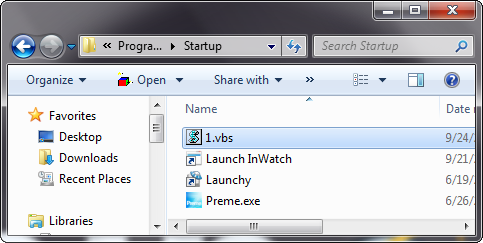
For Windows Vista & Windows 7- C:\Users\Username\AppData\Roaming\Microsoft\Windows\Start Menu\Programs\Startup.( replace the Username by the name of current logged in user) for instance, in my case it is C:\Users\Sourojit\AppData\Roaming\Microsoft\Windows\Start Menu\Programs\Startup
For Windows XP- C:\Documents and Settings\All Users\Start Menu\Programs\Startup.
Step 3 (Optional)
Once the file is copied in the above location your task is finished. You can disable windows startup sound as it may interfere with the narrate welcome message.
You will get this narration only on times when the system is rebooted but not at times of locking and unlocking the system. Performing this task is easy and totally safe. Only thing that you have to take care is to get the script work correctly before placing it in startup folder else no effect will take place.
via tweak and trick
All in one Disk Management Software with Advanced Features : DiskBoss

The main interface of application highlights all features on top bar which includes- Search, Sync, Clean up, Duplicates and Classify. You also have the ability to create scripts, or perform advanced commands that enable you to perform automated actions in one click.
Among these features, Classify is an interesting feature which shows classification of files on Disk. You know how many files such as video, audio, programs or documents you have stored in your PC.

Another nice feature is Organize which lets you initiate command to mass files and folders like create a command to copy / delete / move / compress (and more) all files of a certain size / extension.

Commands: From this window you can use and manage a set of predetermined commands about the features most requested by users so that they can start quickly with a click.
Download DiskBoss
5 DJ Music Mixers
Virtual DJ Home: the jewel in the crown
Virtual DJ Home has earned its own place in the Olympus of the program to mix songs. And this is mainly due to providing everything needed for DJs while it is incredibly simple to use. With Virtual DJ Home, one does not have to worry about the songs and beats, two songs go hand in hand, incorporating an efficient automatic synchronization of BPM (Beats Per Minute).

Virtual DJ Home can mix 2 tracks at once, scratching your taste and add a lot of effects and samples. In addition, Virtual DJ lets you record your sessions Home MP3 or directly to a CD.
Zulu DJ: Mix, convert, edit and record your songs
DJ Zulu is a program to mix songs on the computer that also includes interesting options for editing, conversion and creation of audio tracks. One of the strengths of Zulu DJ mixer is the system of automatic BPM calculation available, which is responsible for synchronizing songs automatically.

In addition, Zulu DJ includes the tools of a mixer such as the crossfader (to be heard a plate or other or both at once) and manual pitch control (speed of the song). But undoubtedly what distinguishes the rest of Zulu DJ DJ free tools is that the download comes with 5 additional applications: WavePad , a sound editor; SoundTap to record streaming audio specialist, MixPad (test) a multitrack mixer for audio production; Switch Audio Converter , an audio file converter, and TempoPerfect a metronome.
Mixxx – Simple design and compatible with all
Mixxx is a handy free software mixer to the delight of anyone who starts to mix music in it as perfectly combines minimalist design with a comfortable distribution of the different controls.

One of the most interesting features is that it includes Mixxx AutoDJ function, through which only need to add to a list the songs you want to ring in your session and Mixxx is responsible for automatically adjusting the mixing BPM and go one after another.
Interchangeable Skins, compatibility with a wide range of MIDI controllers and low latency (delay between the time you touch a control program and hear the sound) make a free option Mixxx highly recommended.
Looptastic : mix anywhere with your iPhone
If you love the DJs and the obsession begins to scratch, do not worry, because there are mobile applications with which you can keep practicing your mixes on the bus on the way home. In this case we selected Looptastic, a free application for iPhone.

Looptastic Free is a powerful and relatively complex, but as you go dominate the real magic will amaze you can do with two fingers. The free application includes 60 loops (sequences of sounds, repeated, forming a song) can be combined different to your will and creating new compositions, as well as apply filters and other sound effects.
Muziic DJ: Web Application to mix YouTube Songs
Amazing. That’s the word that best defines Muziic DJ, a Web application with no need to install any software. And where I get music?, You ask. Well, neither more nor less than YouTube as DJ Muziic thrives on extensive video library of songs that have YouTube so you can mix almost any subject you can think of.

It’s as easy as searching with the program itself and add the song to one of the two plates. Obviously, being we app, DJ Muziic is far from a complete tool for DJs. However, crossfader features a dozen effects, scratch effects and an Auto DJ mode. More than enough for a fascinating web application, you can not stop using!
Which one will you go for? Or do you any other free program for this purpose, let us know by commenting below.
Free Serial Keys of IDM

FName.:www.learnhackz.blogspot.com
LName.:www.idmhere.blogspot.com
Email.:badini4ever@yahoo.com
Serial:any one of these serials:
G0GO7-2ZC9V-YOKZ9-RQ43V
0FXRK-WD9SE-MSPWB-MVCDF
N23WZ-BCAQP-9EDSJ-RRSFR
RXNSZ-SQENL-OZJRP-4Q0XY
S0NNN-QF4VZ-XYY2K-RHFAX
N4VSN-WGO4L-3KDYE-WGSGZ
XUVSX-8I35G-8L4K1-EMZUA
Q2PR0-Y5BUG-YR5XW-UACA8
ZEA9K-7BEFD-UFB1M-MN0WV
AGF44-ACVVE-8T6J6-UUU0S
42SJM-490JF-TD6TW-YVUWC
80582-LI690-E8Q43-5H2DU
BTYFC-8ND8O-YAT70-48DUY
V853J-VX4EG-KE44J-46KK4
Transform Windows XP to Windows 8 | Tranformation Pack for XP / 2003
No matter which Windows version update came, there are still some of our readers sticked to Windows XP. Sometimes, the reason is the compatibility of software programs they use or low system requirements compared to Vista and Windows 7. In this course, they miss out the flavour of updated Windows interface but transformation packs come to rescue.
Windows 8 interface is in talks since when its official teaser was released. We have already seen How to transform Windows 7 to Windows 8 bringing Live Tiles interface.
And now, even Windows Xp users can take advantage of transforming their OS interface into Windows 8. Though, not bringing all the sophisticated features like Windows 8 Live Tiles but atleast imitate appearance by tweaking many basic features.

Windows Transformation Pack named “Eight Remix 2.0” developed by Niwardsoft is capable of turning Windows Xp to Windows 8.
How to transform Windows Xp to Windows 8
Download Eight Remix XP
Installer is just 19.2 MB but takes 182 MB of space on Hard Disk after installation. It replaces almost all system files responsible for Windows XP Visual appearance.

Make sure you check on “create restore point” as we are going to change System Files. Installation takes quite long to complete and you will need to restart the system to take effect all the changes made.

Right from Logon Screen, you will start experiencing changes visually. Start button, Taskbar and Window Interface is given a glassy look. There is a ‘Show Desktop’ button like thing at the right-end of taskbar but it isn’t actually. You can install Show Desktop button on XP however afterwards.
Program features a nice tool called “Reloader” which will reset all the icons and appearance changes in case you or Windows Update mess up something with system files.
Also, it has clean uninstall option which will remove all the components of Remix Theme and revert back to default Windows XP theme restoring all default theme files in case you feel like.
Note: This is a standalone program and no manual tweaks required. Compatible with all variants of Windows XP 32 Bit and Windows 2003. Doesn’t Support 64 Bit Windows OS.


Crysis 2 v.1.81 FULL (2011/MULTI2)

System requirements:
- Microsoft Windows XP / Vista / Windows 7
- Processor: Intel Core 2 Duo 2.4 GHz / AMD Athlon 64 X2 4800 +
- Memory: 1 GB RAM (2 GB for Vista / Windows 7)
- Video card: nVidia GeForce 8800 / ATI Radeon HD 3850 with 512 MB VRAM
- Sound Card: DirectX 9.0c compatible
- Hard disk: 8 GB
DOWNLOAD:-
from Filesonic:
http://www.filesonic.com/file/1228773624/Crysis_II_v.1.81.part09.rar
http://www.filesonic.com/file/1228773054/Crysis_II_v.1.81.part10.rar
http://www.filesonic.com/file/1228743664/Crysis_II_v.1.81.part03.rar
http://www.filesonic.com/file/1228742744/Crysis_II_v.1.81.part01.rar
http://www.filesonic.com/file/1228743094/Crysis_II_v.1.81.part05.rar
http://www.filesonic.com/file/1228740654/Crysis_II_v.1.81.part02.rar
http://www.filesonic.com/file/1228740664/Crysis_II_v.1.81.part04.rar
http://www.filesonic.com/file/1228731654/Crysis_II_v.1.81.part11.rar
http://www.filesonic.com/file/1228727114/Crysis_II_v.1.81.part12.rar
http://www.filesonic.com/file/1228685644/Crysis_II_v.1.81.part06.rar
http://www.filesonic.com/file/1228685664/Crysis_II_v.1.81.part07.rar
http://www.filesonic.com/file/1228685704/Crysis_II_v.1.81.part08.rar
from Fileserve:
http://www.fileserve.com/file/KJx2Cce/Crysis_II_v.1.81.part01.rar
http://www.fileserve.com/file/2GPnvu4/Crysis_II_v.1.81.part02.rar
http://www.fileserve.com/file/3JsEtmm/Crysis_II_v.1.81.part03.rar
http://www.fileserve.com/file/FgZ34pa/Crysis_II_v.1.81.part04.rar
http://www.fileserve.com/file/nVpB8uG/Crysis_II_v.1.81.part05.rar
http://www.fileserve.com/file/33Chfdf/Crysis_II_v.1.81.part06.rar
http://www.fileserve.com/file/3KmuSry/Crysis_II_v.1.81.part07.rar
http://www.fileserve.com/file/rjedrPf/Crysis_II_v.1.81.part08.rar
http://www.fileserve.com/file/tRDcVnp/Crysis_II_v.1.81.part09.rar
http://www.fileserve.com/file/DaBh22k/Crysis_II_v.1.81.part10.rar
http://www.fileserve.com/file/gAKrMKA/Crysis_II_v.1.81.part11.rar
http://www.fileserve.com/file/jwmgBNv/Crysis_II_v.1.81.part12.rar
from Uploadstation:
http://www.uploadstation.com/file/Pze3zu4/Crysis_II_v.1.81.part01.rar
http://www.uploadstation.com/file/uCVunR3/Crysis_II_v.1.81.part02.rar
http://www.uploadstation.com/file/ZN3tuRC/Crysis_II_v.1.81.part03.rar
http://www.uploadstation.com/file/xhFMsav/Crysis_II_v.1.81.part04.rar
http://www.uploadstation.com/file/ydn9Jev/Crysis_II_v.1.81.part05.rar
http://www.uploadstation.com/file/Nzrr6nh/Crysis_II_v.1.81.part06.rar
http://www.uploadstation.com/file/rFqZEtZ/Crysis_II_v.1.81.part07.rar
http://www.uploadstation.com/file/knzdFUM/Crysis_II_v.1.81.part08.rar
http://www.uploadstation.com/file/sFwFVbA/Crysis_II_v.1.81.part09.rar
http://www.uploadstation.com/file/jub7men/Crysis_II_v.1.81.part10.rar
http://www.uploadstation.com/file/vdtqDkf/Crysis_II_v.1.81.part11.rar
http://www.uploadstation.com/file/qcSnHNC/Crysis_II_v.1.81.part12.rar
from Wupload:
http://www.wupload.com/file/18838287/Crysis_II_v.1.81.part01.rar
http://www.wupload.com/file/18838103/Crysis_II_v.1.81.part02.rar
http://www.wupload.com/file/18838285/Crysis_II_v.1.81.part03.rar
http://www.wupload.com/file/18838149/Crysis_II_v.1.81.part04.rar
http://www.wupload.com/file/18838290/Crysis_II_v.1.81.part05.rar
http://www.wupload.com/file/18839707/Crysis_II_v.1.81.part06.rar
http://www.wupload.com/file/18839903/Crysis_II_v.1.81.part07.rar
http://www.wupload.com/file/18836244/Crysis_II_v.1.81.part08.rar
http://www.wupload.com/file/18839053/Crysis_II_v.1.81.part09.rar
http://www.wupload.com/file/18839118/Crysis_II_v.1.81.part10.rar
http://www.wupload.com/file/18838982/Crysis_II_v.1.81.part11.rar
http://www.wupload.com/file/18838142/Crysis_II_v.1.81.part12.rar
Powered by Qumana
Sharing Desktop Screen Online was never so easy, Freeware Tool
We often want to share our Computer Screen with other person (may be a friend, relative or client) which can be used to show them a presentation or demonstrate something. There are many software to accomplish this task but they are often Paid and difficult to use. Join.Me is however very simple, Free, fast and easy alternative for it.
Using Join.me is dead simple, On their webpage, You get two options- Either Share your screen or see someone Else’s screen.

How to share your Screen with others?
If you want to share your screen, Click on Share which download a small application launcher. On executing this app, you get a random ID which has to be given to a person to enable screen sharing. This is actually a URL [ https://join.me/XXX-XXX-XXX ] where XXX is a random unique code. When a person on other side, Pastes that URL in address bar of Browser, he will start seeing your screen as a Flash Content.

How to view someone Else’s screen?
Real time screen sharing will make you feel that you all are at same place. You need the unique ID to see other’s screen or the URL shared by him. No need to install any software, just paste the URL in browser to start seeing. You can set your Browser to Full view by pressing F-11 and get Full-screen presentation.

One suggested use of this tool can be during lack of a Projector in a Presentation or showing the reports or Assignment to your Batch mates / Colleagues.
So, if you are looking for a simple and free resource through which you can share screens with any number of people without any restriction for unlimited time then Join.Me is one thing to consider.
It is Indeed a special tool dedicated to the screen-sharing made by the developers of LogMeIn, Completely free and usable on Both Windows and Mac OS, thanks to Which , Within A Few clicks and without Any Kind of complication , So You Can share screen of your PC Directly Online.
That We Do Not Simply download the appropriate application Directly from the official page of Join.me and then proceed with the installation process on your PC, then We Will not Have to do is invite others to attend ITS sessions resorting to the use of a special link.
The service , Which for the features Offered Is Suitable for use even less of experts , Also offers ITS users a special phone number and a special chat integrated in Such a way as to allow a much Easier and faster communication Between different users , all without spending a penny.
Note: Windows and Mac screen can be shared but to view the screen, you just need a web browser supporting Flash which is irrespective of the operating system.
Site: Join.me
Create Your Own Ringtone Online and Download in Multiple Formats
To create your own ringtones, visit Brinked.

You have to create an account first. It takes couple of minutes to complete the initials. Now, go to “Make Ringtone” tab.

Click the “browse” button and select your favorite tune from the local drive. Hit “UPLOAD”.

Within few seconds the audio file will be uploaded.

Provide details for the ringtone and click “CREATE RINGTONE”.

It will take couple of seconds to create your desired ringtone.

Confirm that the tune is not copyrighted material. Save it.

The ringtone is ready for download. Select your preferred file type compatible with your handset.

You can create a ringtone from your favorite YouTube videos too. Just copy and paste the URL of the video into the space provided. Hit “GRAB THIS”. Wait for few seconds to download and convert the file. Rest of the steps is similar as before.

You can also download free ringtones available there. There are four tabs, “Featured”, “What’s Hot”, “Most Downloaded” and “Most Recent”.

Browse the collection and download your preferred ones.
Free Calling to India UK US Canada Australia China VOIP
Yes, there are no hidden requirements or conditions to avail this offer. Pennytel (as seen on MyDigitalLife ) is Australia based VOIP service provider allowing you to call most popular countries in the world free of charge. It is available for existing customers as well as new sign-up.
Free Calling to India UK US Canada Australia China VOIP
Go to Promotional Page and Register on Pennytel and all the required information will be mailed to you.

After successful registration, go back again to promotional page and enter Email ID you used to register to avail this offer.
The promotion includes Australia, Canada, China, India, Hong Kong, New Zealand, Singapore, the UK and the USA.
How to make free calls from PennyTel
To start making free calls, you have multiple ways. You can try Pennytel iPhone app, SoftPhone, SmartDial or Landline.
Out of these options, SmartDial allows you to make calls using your mobile phone. To use Landline, You need ATA (Analogue Telephone Adapter) and iPhone users can go for official app.
Moreover, Pennytel supports SIP Gates too, so use the following setting in you SIP client:
SIP Proxy : sip.pennytel.com
Domain : sip.pennytel.com
SIP Register : Yes
Preferred Codec : g729, g723
Port : 5060
I will recommend using SoftPhone if you find above options difficult. Login to your Portal, enable Softphone and use it directly from web browser to start making calls directly without configuring anything. This requires Java applet installed to get working.

This Softphone is more or less like Google Voice Dialer. While dialing don’t forget to add Country Code and enjoy free calling uninterrupted anywhere in the world free of charge!
Note: For Australia, New Zealand and UK, the free calls is to landline only, excluding calls to mobiles and special numbers. Other countries of Canada, China, India, Hong Kong, Singapore, the USA, both calls to mobile phone and fixed line is free.
Free Long SMS to India, Singapore, Pakistanl, Malaysia, All Asia this New Year 2011
Free SMS to following countries:
- Afghanistan
- Bangladesh
- Bhutan
- Brunei
- Cambodia
- India
- Indonesia
- Japan
- Laos
- Malaysia
- Mongolia
- Nepal
- Philippines
- Pakistan
- Singapore
- Sri Lanka
- Taiwan
- Thailand
- Vietnam
How to Send Free SMS from Vopium
Register on Vopium (it’s free) and download their Mobile application compatible with Symbian, Android, Blackberry, iPhone and Java applet too.

Get started by logging in to application installed on your phone and start sending SMS to near and dear ones. Balance credit is shown as 0.00$ but you can send SMS anyway.
SMS Length allowed is 960 characters which is ultra long and enough.
Your Phone number is sent as Sender’s number and hence your name will appear on Recipient’s inbox.
The offer is valid till 1st Jan, 2011 so now is your time to say all that you want by sending free SMS to your friends and relatives.
To prevent abuse, a fair usage policy of maximum 100 SMS per day applies for this campaign.
This is quite awesome offer as 31st December and 1st January are considered as Blackout days by all Mobile phone carriers and using this trick, you can send SMS on the go.
What more! New registered users get free 15 minutes of international calling via VOIP.
5 Free Social Media Brand Monitoring Tools
More & more people are revealing their likes or dislikes about a brand on those sites, but one finds very tough to keep tracks of those conversations of customers online. Therefore, we need a tool where we can monitor & know what actually people are saying about our brands.

There are plenty of paid tools available online but we’d like to address some free tools. <Image Credits >
Below are Free Social Media Monitor Tools
1. Social Mention
This is one of the best social media monitoring tool available online where you can find each & every data about your brand. There are so many options available in this site such as
- Top Keywords – Where you would find the keywords which speaks about your brand
- Top Users – Users who are ranting about your brand
- Top Hashtags – consisting of your keyword or brand name
- Top Sources – sources where you were getting involved
I think one should use this site to monitor not only theirs but also of their competitors to understand where their competitors are heading in social media.
2. Ice Rocket
It’s also one of the good social monitoring site, it acts more like a search engine but provide results from blog, twitter, myspace, images, facebook, videos & more.
3. Backtype
This is a good site where you can see the analytics of your site tweets & comments on weekly basis. You can also compare your social media presence with competitors who are engaging online.
4. Twazzup
Interface is not so overwhelming but overall a good site to know the on which keywords your brands are mentioned in a tweets.
Addict-O-Matic is one such tool where he gathers info about your keyword or brand across the web such as bing, google blog, tweetmeme, youtube, yahoo, wikio, twitter & many more.
Those are the 5 social media monitoring tools which are good enough to know more about your brands. Which other social media do you use to monitor your brand?
Web Easy 7 Professional Serial Number | Quick Website Design Maker
As the name includes “Easy”, software interface is dead easy and working operation is simple so that you create website designs quickly and effortlessly. You don’t have to deal with any HTML code instead select a template and wizard will carry on asking you related details and voila! your site is ready.
What I liked more about this Website Design software is step by step Wizard which is not so common and user will feel like filling up a form. Program has some 500 website templates (some may look amateur) and after wizard you can visually edit the website.

The program is meant for those who don’t any knowledge about website making and want to create websites and publish them on the go! When the program is made considering noobs, you can’t expect Professional designed outputs but still they are upto some mark well designed.
Web Easy Professional 7 Serial Number
Go to Promo page and enter your details. On the next page, Serial Number for activation will be presented moreover you will receive an email with activation details.

Download WebEasy7Express-UK.exe [ 24 MB ]
Easily Group & Organize Photos According to Events with a Single Click
Well there is always a solution to every problem. Media Event Organizer is a freeware that will help u organize your photos daily. It is surprising how it automatically organizes the photos on your computer as per the events that you specify.

Its functioning is pretty simple. Based on the date when the photo was taken, it can group the photos in one folder. If we say that in a trip we take photos and keep adding them randomly, the manager will group all of them for the entire span of trip in one folder and it can create sub folders of photos days wise if required as per each day.

This feature works on the fact that it organizes the photo on the basis of the event gap that we specify. If we tell it that an event is for say seven days, then all photos’ date that are less than seven will be put in a single event’s folder. Media Event Organizer also gives you another freedom.
If you create separate daily folders for the photos in a long trip and keep adding them separately, Media Event Organizer will scan all the photos in your computer and fetch all the photos during that span of trip and put them in one folder.
How to set custom Facebook Colors
- Please make sure GreasesMonkey is installed in your Firefox and is enabled. If you don’t have it please download and install it here.
- When you have Firefox and Greasemonkey download and install the Facebook Color Changer user script.
- Now, when viewing any page on Facebook simply right click on the Greasemonkey icon on Firefox and navigate to Userscript command –> Customize Facebook Color.
- Select the colours you’d like facebook to be, click “Set!”, and you’re done.


From next time on you will not see the boring blue color of Facebook any more and you can change it on weekly or daily basis to get a newly painted Wall every day. If you completely want to revamp the look of Facebook then you may try Facebook Themes.
Download Facebook Color Changer
How to Login Multiple Account of Facebook, Gmail, etc on Same Browser
For Firefox Users
- Download and Install the Multifox Plugin. Allow any application request in the installation. Multifox is an extension that allows Firefox to connect to websites using different user names. Simultaneously.
- Once the Plugin in installed successfully restart your Firefox.
- Now right click any where on the Tab bar and select “Open in a New Identity Profile”.
- Selecting this option will open a new window using which you can login to same service with another username.


If you don’t want to switch windows you can drag and drop the tab in the existing windows.
For Chrome Users
Google thinks so much for their users. Unlike Firefox fans you guys don’t need to install any plugin for the trick. Just initiate incognito tabs using Ctrl+Shift+N and open same service with two different account.

Get Free SMS Alerts for New Incoming Emails from Gmail, Yahoo, MSN, etc
- Register for a free account at way2sms, verify yourself and login to your customer dashboard.
- Once you are in you control panel click on “Mail Alerts” on the top right section of the page.
- You will be asked to activate the setting for your account. Once you activate it configure the best suitable time for you to get the SMS updates.
- Once you have configured the settings and activated it you will be provided a unique Way2SMS Mail Id like xxxxxxxx@way2sms.com.
- Now you need to configure your mail to receive the notification.


Configuring the Mail
- Logon to your email provider account.
- Click on settings & then click on ‘FORWARDING/POP/IMAP’ option
- Select ‘Forward a copy of incoming mail to” option & Enter your Way2SMS Email ID xxxxxxxx@way2sms.com there.
- Gmail sends a verification code to xxxxxxxx@way2sms.com.
- You will receive Gmail confirmation mail alert on your mobile with subject line containing confirmation code.
- Copy and paste the verification code in Gmail verification box. Click On Verify.
- Voila, you will now receive alerts for every incoming mail that arrives in your mail

For Yahoo and Gmail users there is a direct one click configuration button on the left panel.
If you are Nokia Symbian user, you can try Blacmail app to receive emails as SMS without GPRS connectivity.
Powered by Qumana


